Where are you testing from? I'm going to guess: a datacenter. Residential customers won't see anything this fast. I'm in a small town in Kansas, connected by 1 Gbit ATT fiber. I'm getting ~26ms to 1.1.1.1 and ~19ms to my private DNS resolver that I host in a datacenter in Dallas. Google DNS comes in around 19ms.
I suspect that Cloudflare and Google DNS both have POPs in Dallas, which accounts for the similar numbers to my private resolver. My point is, low latencies to datacenter-located resolver clients is great but the advantage is reduced when consumer internet users have to go across their ISP's long private fiber hauls to get to a POP. Once you're at the exchange point, it doesn't really matter which provider you choose. Go with the one with the least censorship, best security, and most privacy. For me, that's the one I run myself.
Side note: I wish AT&T was better about peering outside of their major transit POPs and better about building smaller POPs in regional hubs. For me, that would be Kansas City. Tons of big ISPs and content providers peer in KC but AT&T skips them all and appears to backhaul all Kansas traffic to DFW before doing any peering.
  64 bytes from 1.1.1.1: icmp_seq=0 ttl=128 time=2 ms
  64 bytes from 1.1.1.1: icmp_seq=1 ttl=128 time=2 ms
  64 bytes from 1.1.1.1: icmp_seq=2 ttl=128 time=2 ms
  64 bytes from 1.1.1.1: icmp_seq=3 ttl=128 time=9 ms
  64 bytes from 1.1.1.1: icmp_seq=4 ttl=128 time=2 ms
Google:
  64 bytes from 8.8.8.8: icmp_seq=0 ttl=54 time=12 ms
  64 bytes from 8.8.8.8: icmp_seq=1 ttl=54 time=11 ms
  64 bytes from 8.8.8.8: icmp_seq=2 ttl=54 time=13 ms
  64 bytes from 8.8.8.8: icmp_seq=3 ttl=54 time=45 ms
  64 bytes from 8.8.8.8: icmp_seq=4 ttl=54 time=14 ms
  64 bytes from 8.8.8.8: icmp_seq=5 ttl=54 time=11 ms
  64 bytes from 8.8.8.8: icmp_seq=6 ttl=54 time=34 ms
Quad9:
  64 bytes from 9.9.9.9: icmp_seq=0 ttl=53 time=10 ms
  64 bytes from 9.9.9.9: icmp_seq=1 ttl=53 time=69 ms
  64 bytes from 9.9.9.9: icmp_seq=2 ttl=53 time=14 ms
  64 bytes from 9.9.9.9: icmp_seq=3 ttl=53 time=58 ms
  64 bytes from 9.9.9.9: icmp_seq=4 ttl=53 time=52 ms
One thing I noticed is that when I first pinged 1.1.1.1 I got 14ms, which then quickly dropped to ~3ms consistently:
  64 bytes from 1.1.1.1: icmp_seq=0 ttl=128 time=14 ms
  64 bytes from 1.1.1.1: icmp_seq=1 ttl=128 time=14 ms
  64 bytes from 1.1.1.1: icmp_seq=2 ttl=128 time=2 ms
  64 bytes from 1.1.1.1: icmp_seq=3 ttl=128 time=3 ms
  64 bytes from 1.1.1.1: icmp_seq=4 ttl=128 time=1 ms
  64 bytes from 1.1.1.1: icmp_seq=5 ttl=128 time=4 ms
  PING 1.1.1.1 (1.1.1.1): 56 data bytes
  64 bytes from 1.1.1.1: icmp_seq=0 ttl=52 time=241.529 ms
  64 bytes from 1.1.1.1: icmp_seq=1 ttl=52 time=318.034 ms
  64 bytes from 1.1.1.1: icmp_seq=2 ttl=52 time=337.291 ms
  64 bytes from 1.1.1.1: icmp_seq=3 ttl=52 time=255.748 ms
  64 bytes from 1.1.1.1: icmp_seq=4 ttl=52 time=247.765 ms
  64 bytes from 1.1.1.1: icmp_seq=5 ttl=52 time=235.611 ms
  64 bytes from 1.1.1.1: icmp_seq=6 ttl=52 time=239.427 ms
  64 bytes from 1.1.1.1: icmp_seq=7 ttl=52 time=247.911 ms
  64 bytes from 1.1.1.1: icmp_seq=8 ttl=52 time=260.911 ms
  64 bytes from 1.1.1.1: icmp_seq=9 ttl=52 time=281.153 ms
  64 bytes from 1.1.1.1: icmp_seq=10 ttl=52 time=300.363 ms
  64 bytes from 1.1.1.1: icmp_seq=11 ttl=52 time=234.296 ms
    $ ping 1.1.1.1
    PING 1.1.1.1 (1.1.1.1): 56 data bytes
    Request timeout for icmp_seq 0
    Request timeout for icmp_seq 1
    Request timeout for icmp_seq 2
    Request timeout for icmp_seq 3
    Request timeout for icmp_seq 4
    Request timeout for icmp_seq 5
    Request timeout for icmp_seq 6
    Request timeout for icmp_seq 7
    Request timeout for icmp_seq 8
    Request timeout for icmp_seq 9
    Request timeout for icmp_seq 10

    $ ping 1.0.0.1
    PING 1.0.0.1 (1.0.0.1): 56 data bytes
    64 bytes from 1.0.0.1: icmp_seq=0 ttl=50 time=167.359 ms
    64 bytes from 1.0.0.1: icmp_seq=1 ttl=50 time=165.791 ms
    64 bytes from 1.0.0.1: icmp_seq=2 ttl=50 time=165.846 ms
    64 bytes from 1.0.0.1: icmp_seq=3 ttl=50 time=166.755 ms
    64 bytes from 1.0.0.1: icmp_seq=4 ttl=50 time=166.694 ms
    64 bytes from 1.0.0.1: icmp_seq=5 ttl=50 time=166.088 ms
    64 bytes from 1.0.0.1: icmp_seq=6 ttl=50 time=166.460 ms
    64 bytes from 1.0.0.1: icmp_seq=7 ttl=50 time=166.668 ms
    64 bytes from 1.0.0.1: icmp_seq=8 ttl=50 time=166.753 ms
    64 bytes from 1.0.0.1: icmp_seq=9 ttl=50 time=165.670 ms
    64 bytes from 1.0.0.1: icmp_seq=10 ttl=50 time=166.816 ms
  64 bytes from 1.1.1.1: icmp_seq=0 ttl=57 time=17.580 ms
  64 bytes from 1.1.1.1: icmp_seq=1 ttl=57 time=18.025 ms
  64 bytes from 1.1.1.1: icmp_seq=2 ttl=57 time=17.780 ms
  64 bytes from 1.1.1.1: icmp_seq=3 ttl=57 time=18.231 ms
  64 bytes from 1.1.1.1: icmp_seq=4 ttl=57 time=17.906 ms
  64 bytes from 1.1.1.1: icmp_seq=5 ttl=57 time=18.447 ms
  PING 1.1.1.1 (1.1.1.1): 56 data bytes
  64 bytes from 1.1.1.1: icmp_seq=0 ttl=59 time=22.806 ms
  64 bytes from 1.1.1.1: icmp_seq=1 ttl=59 time=23.321 ms
  64 bytes from 1.1.1.1: icmp_seq=2 ttl=59 time=24.379 ms
  64 bytes from 1.1.1.1: icmp_seq=3 ttl=59 time=25.869 ms
  64 bytes from 1.1.1.1: icmp_seq=4 ttl=59 time=24.485 ms
  64 bytes from 1.1.1.1: icmp_seq=5 ttl=59 time=24.165 ms

  PING 8.8.8.8 (8.8.8.8): 56 data bytes
  64 bytes from 8.8.8.8: icmp_seq=0 ttl=57 time=23.005 ms
  64 bytes from 8.8.8.8: icmp_seq=1 ttl=57 time=22.867 ms
  64 bytes from 8.8.8.8: icmp_seq=2 ttl=57 time=24.461 ms
  64 bytes from 8.8.8.8: icmp_seq=3 ttl=57 time=23.680 ms
  64 bytes from 8.8.8.8: icmp_seq=4 ttl=57 time=35.581 ms
  64 bytes from 8.8.8.8: icmp_seq=5 ttl=57 time=21.033 ms
  64 bytes from 8.8.8.8: icmp_seq=6 ttl=57 time=41.634 ms
  ping 1.1.1.1
  PING 1.1.1.1 (1.1.1.1) 56(84) bytes of data.
  64 bytes from 1.1.1.1: icmp_seq=1 ttl=58 time=1.36 ms
  64 bytes from 1.1.1.1: icmp_seq=2 ttl=58 time=1.32 ms
  64 bytes from 1.1.1.1: icmp_seq=3 ttl=58 time=1.34 ms
  64 bytes from 1.1.1.1: icmp_seq=4 ttl=58 time=1.38 ms
  64 bytes from 1.1.1.1: icmp_seq=5 ttl=58 time=1.37 ms

  ping 8.8.8.8
  PING 8.8.8.8 (8.8.8.8) 56(84) bytes of data.
  64 bytes from 8.8.8.8: icmp_seq=1 ttl=56 time=1.33 ms
  64 bytes from 8.8.8.8: icmp_seq=2 ttl=56 time=1.38 ms
  64 bytes from 8.8.8.8: icmp_seq=3 ttl=56 time=1.35 ms
  64 bytes from 8.8.8.8: icmp_seq=4 ttl=56 time=1.36 ms
  64 bytes from 8.8.8.8: icmp_seq=5 ttl=56 time=1.35 ms
   PING 1.1.1.1 (1.1.1.1): 56 data bytes
   64 bytes from 1.1.1.1: icmp_seq=0 ttl=60 time=5.044 ms
   64 bytes from 1.1.1.1: icmp_seq=1 ttl=60 time=6.447 ms
   64 bytes from 1.1.1.1: icmp_seq=2 ttl=60 time=6.371 ms
   64 bytes from 1.1.1.1: icmp_seq=3 ttl=60 time=6.308 ms
   64 bytes from 1.1.1.1: icmp_seq=4 ttl=60 time=7.317 ms
   64 bytes from 1.1.1.1: icmp_seq=5 ttl=60 time=5.989 ms
Dubai:
PING 1.1.1.1 (1.1.1.1): 56 data bytes
64 bytes from 1.1.1.1: icmp_seq=0 ttl=57 time=48.728 ms
64 bytes from 1.1.1.1: icmp_seq=1 ttl=57 time=48.450 ms
64 bytes from 1.1.1.1: icmp_seq=2 ttl=57 time=47.266 ms
64 bytes from 1.1.1.1: icmp_seq=3 ttl=57 time=45.320 ms
64 bytes from 1.1.1.1: icmp_seq=4 ttl=57 time=46.470 ms
  PING 1.1.1.1 (1.1.1.1): 56 data bytes
  64 bytes from 1.1.1.1: icmp_seq=0 ttl=55 time=14.053 ms
  64 bytes from 1.1.1.1: icmp_seq=1 ttl=55 time=12.715 ms
  64 bytes from 1.1.1.1: icmp_seq=2 ttl=55 time=13.615 ms
  64 bytes from 1.1.1.1: icmp_seq=3 ttl=55 time=14.018 ms
  64 bytes from 1.1.1.1: icmp_seq=4 ttl=55 time=12.261 ms
  64 bytes from 1.1.1.1: icmp_seq=5 ttl=55 time=11.428 ms
  64 bytes from 1.1.1.1: icmp_seq=6 ttl=55 time=11.950 ms
  64 bytes from 1.1.1.1: icmp_seq=7 ttl=55 time=13.034 ms
  64 bytes from 1.1.1.1: icmp_seq=8 ttl=55 time=13.679 ms
  64 bytes from 1.1.1.1: icmp_seq=9 ttl=55 time=12.415 ms
  64 bytes from 1.1.1.1: icmp_seq=10 ttl=55 time=12.088 ms
Pinging 1.1.1.1 with 32 bytes of data:
Reply from 89.228.6.1: Destination net unreachable.
Reply from 89.228.6.1: Destination net unreachable.
Reply from 89.228.6.1: Destination net unreachable.
Reply from 89.228.6.1: Destination net unreachable.
PING 1.1.1.1 (1.1.1.1): 56 data bytes
64 bytes from 1.1.1.1: icmp_seq=0 ttl=61 time=15.860 ms
64 bytes from 1.1.1.1: icmp_seq=1 ttl=61 time=15.799 ms
64 bytes from 1.1.1.1: icmp_seq=2 ttl=61 time=15.616 ms
64 bytes from 1.1.1.1: icmp_seq=3 ttl=61 time=15.769 ms
64 bytes from 1.1.1.1: icmp_seq=4 ttl=61 time=15.431 ms
64 bytes from 1.1.1.1: icmp_seq=5 ttl=61 time=16.459 ms
64 bytes from 1.1.1.1: icmp_seq=6 ttl=61 time=15.860 ms
64 bytes from 1.1.1.1: icmp_seq=7 ttl=61 time=15.930 ms
Tokyo, domestic 2Gbps FO but connected through Wifi:
    PING 1.1.1.1 (1.1.1.1): 56 data bytes
    64 bytes from 1.1.1.1: icmp_seq=0 ttl=57 time=5.531 ms
    64 bytes from 1.1.1.1: icmp_seq=1 ttl=57 time=4.420 ms
    64 bytes from 1.1.1.1: icmp_seq=2 ttl=57 time=5.450 ms
    64 bytes from 1.1.1.1: icmp_seq=3 ttl=57 time=5.438 ms
    64 bytes from 1.1.1.1: icmp_seq=4 ttl=57 time=4.231 ms
    64 bytes from 1.1.1.1: icmp_seq=5 ttl=57 time=5.933 ms


    PING 8.8.8.8 (8.8.8.8): 56 data bytes
    64 bytes from 8.8.8.8: icmp_seq=0 ttl=57 time=6.440 ms
    64 bytes from 8.8.8.8: icmp_seq=1 ttl=57 time=4.574 ms
    64 bytes from 8.8.8.8: icmp_seq=2 ttl=57 time=4.684 ms
    64 bytes from 8.8.8.8: icmp_seq=3 ttl=57 time=4.992 ms
    64 bytes from 8.8.8.8: icmp_seq=4 ttl=57 time=5.942 ms
    64 bytes from 8.8.8.8: icmp_seq=5 ttl=57 time=5.955 ms
$ ping 1.1.1.1
PING 1.1.1.1 (1.1.1.1): 56 data bytes
64 bytes from 1.1.1.1: icmp_seq=0 ttl=58 time=111.781 ms
64 bytes from 1.1.1.1: icmp_seq=1 ttl=58 time=102.982 ms
64 bytes from 1.1.1.1: icmp_seq=2 ttl=58 time=102.206 ms
64 bytes from 1.1.1.1: icmp_seq=3 ttl=58 time=110.135 ms
64 bytes from 1.1.1.1: icmp_seq=4 ttl=58 time=110.085 ms
$ ping 8.8.8.8
PING 8.8.8.8 (8.8.8.8): 56 data bytes
64 bytes from 8.8.8.8: icmp_seq=0 ttl=58 time=6.886 ms
64 bytes from 8.8.8.8: icmp_seq=1 ttl=58 time=5.475 ms
64 bytes from 8.8.8.8: icmp_seq=2 ttl=58 time=5.674 ms
64 bytes from 8.8.8.8: icmp_seq=3 ttl=58 time=5.557 ms
64 bytes from 8.8.8.8: icmp_seq=4 ttl=58 time=7.066 ms
$ ping 9.9.9.9
PING 9.9.9.9 (9.9.9.9): 56 data bytes
64 bytes from 9.9.9.9: icmp_seq=0 ttl=58 time=5.880 ms
64 bytes from 9.9.9.9: icmp_seq=1 ttl=58 time=5.534 ms
64 bytes from 9.9.9.9: icmp_seq=2 ttl=58 time=5.251 ms
64 bytes from 9.9.9.9: icmp_seq=3 ttl=58 time=5.194 ms
64 bytes from 9.9.9.9: icmp_seq=4 ttl=58 time=5.698 ms
Something interesting I saw pointed out on the reddit thread about this is the ttl between 1.1.1.1 and 8.8.8.8 is the ttl is way different.
Your pings also have the same thing showing up 128 vs 53. I tried on my laptop and get something simmilar. traceroute to 1.1.1.1 is 1 hop which is wrong. 1.0.0.1 shows a few hops.
Unless you tell it not to, ping will try a reverse lookup on the IP you are pinging in order to display that to you in the output. It's a good idea to keep that in mind when you ping something, especially if you notice the first ping is abnormally slow.
Perhaps that depends on operating system. In the 30 years I have been using ping on Linux, the reverse lookup time is absolutely included in the first ping time.
I think AT&T's fiber modems are using 1.1.1.1. I'm getting < 1ms ping times and according to Cloudflare's website there's no data center close enough to me for that to be possible without violating the speed of light.
what happens if you go to https://1.1.1.1 in a browser? It should have a valid TLS cert and have a big banner that says, among other things, "Introducing 1.1.1.1". If your ISP's CPE or anything else is fucking with traffic to that IP, it wont load/display that
Call your ISP and ask them why they're blocking access to some websites. Ask them if there are any other websites they're blocking. Tweet about it. Etc
  $ ping 1.1.1.1
  PING 1.1.1.1 (1.1.1.1) 56(84) bytes of data.
  64 bytes from 1.1.1.1: icmp_seq=1 ttl=56 time=10.8 ms
  64 bytes from 1.1.1.1: icmp_seq=2 ttl=56 time=11.3 ms
  64 bytes from 1.1.1.1: icmp_seq=3 ttl=56 time=10.7 ms
  64 bytes from 1.1.1.1: icmp_seq=4 ttl=56 time=10.9 ms

  PING 8.8.8.8 (8.8.8.8) 56(84) bytes of data.
  64 bytes from 8.8.8.8: icmp_seq=1 ttl=60 time=10.7 ms
  64 bytes from 8.8.8.8: icmp_seq=2 ttl=60 time=11.3 ms
  64 bytes from 8.8.8.8: icmp_seq=3 ttl=60 time=11.1 ms
  64 bytes from 8.8.8.8: icmp_seq=4 ttl=60 time=10.5 ms
  PING 1.1.1.1 (1.1.1.1) 56(84) bytes of data.
  64 bytes from 1.1.1.1: icmp_seq=1 ttl=59 time=7.65 ms
  64 bytes from 1.1.1.1: icmp_seq=2 ttl=59 time=8.53 ms
  64 bytes from 1.1.1.1: icmp_seq=3 ttl=59 time=10.2 ms
  64 bytes from 1.1.1.1: icmp_seq=4 ttl=59 time=8.04 ms
  64 bytes from 1.1.1.1: icmp_seq=5 ttl=59 time=7.92 ms
  64 bytes from 1.1.1.1: icmp_seq=6 ttl=59 time=7.85 ms
  64 bytes from 1.1.1.1: icmp_seq=7 ttl=59 time=7.88 ms
  64 bytes from 1.1.1.1: icmp_seq=8 ttl=59 time=7.73 ms
  64 bytes from 1.1.1.1: icmp_seq=9 ttl=59 time=7.73 ms
BigPipe, Spark, Skinny and Vodafone don't believe in peering and thus don't peer with Cloudflare at APE. If you wanted the best performance then 2degrees, Orcon, Voyager or Slingshot are the best for this since they peer.
    iMac   ~ ping 1.1.1.1
    PING 1.1.1.1 (1.1.1.1): 56 data bytes
    64 bytes from 1.1.1.1: icmp_seq=0 ttl=64 time=0.688 ms
    64 bytes from 1.1.1.1: icmp_seq=1 ttl=64 time=0.814 ms
    64 bytes from 1.1.1.1: icmp_seq=2 ttl=64 time=1.153 ms
    64 bytes from 1.1.1.1: icmp_seq=3 ttl=64 time=0.752 ms
    64 bytes from 1.1.1.1: icmp_seq=4 ttl=64 time=0.755 ms
    64 bytes from 1.1.1.1: icmp_seq=5 ttl=64 time=0.789 ms
    64 bytes from 1.1.1.1: icmp_seq=6 ttl=64 time=0.876 ms
    64 bytes from 1.1.1.1: icmp_seq=7 ttl=64 time=0.869 ms
    64 bytes from 1.1.1.1: icmp_seq=8 ttl=64 time=0.830 ms
    64 bytes from 1.1.1.1: icmp_seq=9 ttl=64 time=1.387 ms
    --- 1.1.1.1 ping statistics ---
    10 packets transmitted, 10 packets received, 0.0% packet loss
    round-trip min/avg/max/stddev = 0.688/0.891/1.387/0.204 ms
Pinging 8.8.8.8 averages 8ms. CloudFlare must have a POP here in Nashville?
That's probably because AT&T is using 1.1.1.1 for something internal and breaking the public internet for it's users: you get a really fast ping on 1.1.1.1, but it's not the 1.1.1.1 you are trying to reach.
That's impressive. My AT&T wifi router caps bandwidth at 300mb/s (instead of 1gbs on ethernet) and add 10-20 ms to latency. And this is standing next to it and using 5ghz.


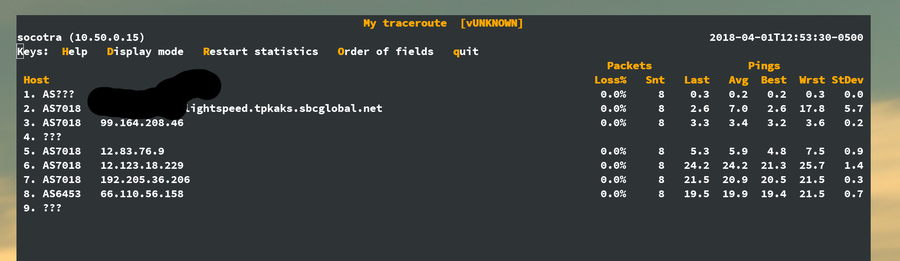
I suspect that Cloudflare and Google DNS both have POPs in Dallas, which accounts for the similar numbers to my private resolver. My point is, low latencies to datacenter-located resolver clients is great but the advantage is reduced when consumer internet users have to go across their ISP's long private fiber hauls to get to a POP. Once you're at the exchange point, it doesn't really matter which provider you choose. Go with the one with the least censorship, best security, and most privacy. For me, that's the one I run myself.
Side note: I wish AT&T was better about peering outside of their major transit POPs and better about building smaller POPs in regional hubs. For me, that would be Kansas City. Tons of big ISPs and content providers peer in KC but AT&T skips them all and appears to backhaul all Kansas traffic to DFW before doing any peering.